








Smart Notebook 22 for Windows
- Free
- 4.51
- 12
- V1.1.0
Free Download for Windows
View an ad to download for free
An Educational Notebook App Made By SMART Technologies.
Transform classroom preparation and delivery with an intuitive interactive whiteboard application that turns lessons into engaging, hands-on experiences. Smart Notebook 22 streamlines planning, presenting, and collaborating so teachers spend less time wrestling with tools and more time teaching.
Many educators struggle with scattered lesson resources, clunky interfaces, and tools that aren’t designed for live, interactive instruction. Smart Notebook 22 addresses these pain points by combining familiar notebook-style organization with built-in interactive activity elements and precise annotation tools, enabling seamless transitions from prep to presentation on any Smart Board-enabled display.
Core Features
- Organized UI — A clear, teacher-focused interface groups pages, resources, and tools logically so you can find materials and switch modes quickly during class.
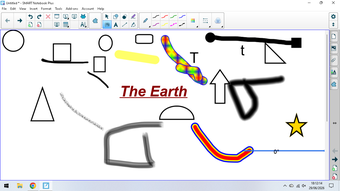
- Pens — A suite of digital pens and drawing tools lets you annotate, highlight, and model problem-solving in real time, preserving handwriting and ink for reuse.
- Link Maker — Quickly convert text or objects into clickable links to external content or internal pages, making navigation between resources effortless for both teachers and students.
- Browser Item — Embed web content directly into lessons without leaving the app, keeping students focused and enabling live demonstrations of online resources.
- Import — Bring in existing files, images, and media from common formats to reuse prior work and enrich lessons without rebuilding materials from scratch.
What sets Smart Notebook 22 apart is its purpose-built alignment with interactive whiteboards and classroom workflows. Rather than bolting interactivity onto a generic slide tool, this software integrates tactile drawing, touch-friendly controls, and a catalog of ready-made activities designed for group participation. The result is a platform that feels native to classroom teaching: fast to navigate, rich in pedagogy-focused features, and reliable during live instruction.
Because it is developed specifically for Smart Technologies hardware, Smart Notebook 22 offers smoother hardware integration and consistent performance when used with Smart Boards and interactive displays. This tight integration minimizes setup friction and reduces the chance of technical interruptions, giving educators confidence during high-stakes lessons and assessments.
This software is best suited for K–12 teachers, instructional coaches, and educators who rely on interactive whiteboards or touchscreen displays. It is ideal for professionals who need a balanced mix of planning tools, live annotation, and engaging activity components—especially those who value quick access to lesson elements and a consistent interface across devices.
Smart Notebook 22 helps turn lesson ideas into interactive learning moments: organize materials faster, draw and annotate naturally, embed web content, and reuse existing resources with minimal effort. For teachers seeking a whiteboard-native solution that prioritizes usability and classroom interactivity, it’s a practical, time-saving choice.
Loading…
App specs
License
Free
Version
1.1.0
Latest update
Platform
Windows
OS
Windows 10
Language
English
Downloads
12
Last month's downloads
- 12
Size
18.16 MB
Developer
- Doctor Games
- More programs (3)
Smart Notebook 22 for PC
- Free
- 4.51
- 12
- V1.1.0
Free Download for PC
View an ad to download for free
User reviews about Smart Notebook 22
Have you tried Smart Notebook 22? Be the first to leave your opinion!
Add reviewTop downloads Teaching & Training for Windows
Top downloads Teaching & Training for Windows
Top downloads Teaching & Training for Windows
Related topics about Smart Notebook 22
Latest articles
Google Search Console rolls out platform properties: social profile traffic reports

DeepSeek is now reportedly designing its own chip: a bid to cut Nvidia reliance

Where to watch Argentina vs Egypt for free today? TV, legal streaming, and kickoff time
Escape the Backrooms is out now on Nintendo Switch 2: full cross-play from day one

Microsoft reportedly sells Undead Labs: State of Decay 3 on Game Pass now in doubt
Laws concerning the use of this software vary from country to country. We do not encourage or condone the use of this program if it is in violation of these laws. Softonic may receive a referral fee if you click or buy any of the products featured here.